
SoCCanvasEighthDemo – UPF Integration
Power intent는 항상 구조와 일치해야 합니다.
🧭 How to design SoC with SoC Canvas
Episode 8에서는
Power Structure로부터 UPF를 생성하고 관리하는 과정을 보여드립니다.
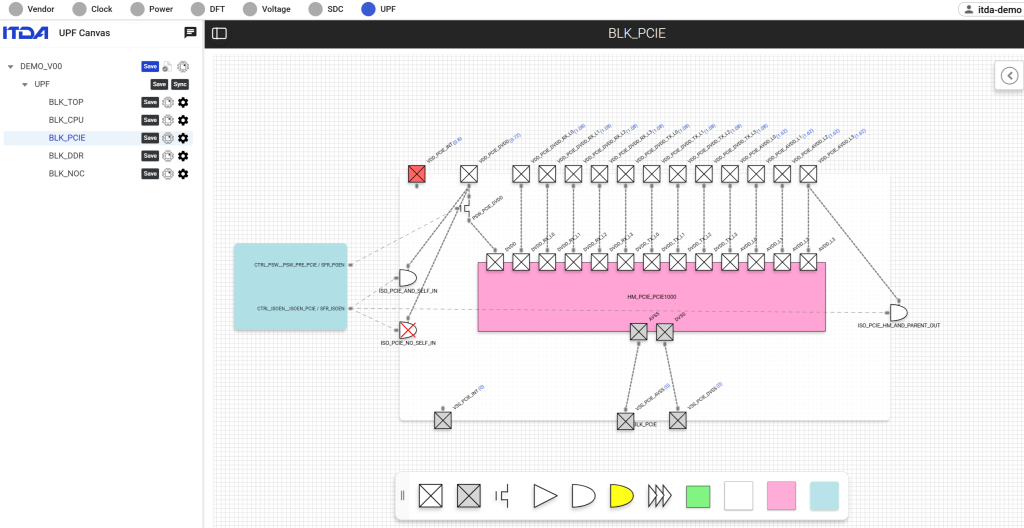
Power Intention을 표현하는 Diagram을 그리면 UPF가 생성됩니다.
✔️ Diagram 기반 UPF 생성
✔️ Power intent consistency 유지
✔️ Hierarchical power domain 지원
🎥 Episode 8: UPF Integration
▶️ 전체 데모 영상이 궁금하신 분들은 댓글이나 DM 주시면 링크를 공유해드리겠습니다.
SoCCanvasEighthDemo – UPF Integration
Power intent must always align with the structure.
🧭 How to design SoC with SoC Canvas
In Episode 8,
we demonstrate the process of creating and managing UPFs from Power Structures.
A UPF is generated by drawing a diagram that represents the Power Intention.
✔️ Diagram-based UPF creation
✔️ Maintaining Power intent consistency
✔️ Supporting Hierarchical power domains
🎥 Episode 8: UPF Integration
▶️ If you are interested in the full demo video, please leave a comment or send a DM, and we will share the link.
💡 Summary
In this video, we explore the UPF (Unified Power Format) feature of SoC Canvas.
Instead of manually writing UPF, engineers can define and review power intent directly from intuitive power diagrams.
Using a visual approach, SoC Canvas enables:
Level Shifter (LS) management
Isolation (ISO) strategy definition
Power Switch (PSW) configuration
Power State Table (PST) management
This keeps power intent synchronized with the actual system structure throughout the design flow.
📌 Key moments:
00:00 – Introduction to UPF Tab & Visualization Philosophy
00:58 – Building Basic Power Diagrams: VDD & Ground
01:20 – Drag-and-Drop Power Components (LS, ISO, PSW)
02:17 – Defining Level Shifter Strategies and Connections
02:58 – Managing Power Scenarios with Power State Tables (PST)
03:30 – Integrating Hard Macros: Modeling & Connectivity
04:31 – Hierarchical Design: Top-Level UPF Diagrams