SoCCanvasSixthDemo – Power Structure Modeling
Power는 wiring이 아니라 architecture입니다.
🧭 How to design SoC with SoC Canvas
Episode 6에서는
Power domain, ISO, LS, PSW를 시각적으로 구성하는 과정을 보여드립니다.
Fine-grain하게 Power를 제어하는 대규모 SOC에서는
✔️ 100개 이상의 Power Domain이 존재할 수 있고,
✔️ 각 Power Domain이 독립적으로 제어되어야 합니다.
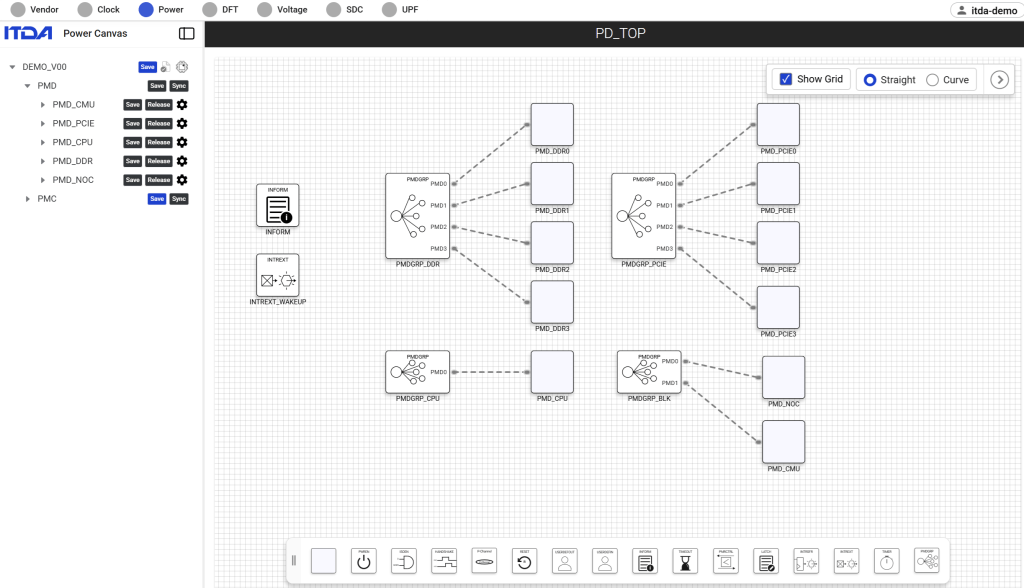
Power Canvas에서는
✔️ Power Domain별로 Power Control Signal을 정의할수 있고
✔️여러개의 Power Domain을 제어하는 Cluster를 구성할 수 있습니다.
🎥 Episode 6: Power Structure Modeling
▶️ 전체 데모 영상이 궁금하신 분들은 댓글이나 DM 주시면 링크를 공유해드리겠습니다.
SoCCanvasSixthDemo – Power Structure Modeling
Power is not wiring, it’s architecture.
🧭 How to design SoC with SoC Canvas
In Episode 6,
we walk through how to visually define Power domains, ISO, LS, and PSW within SoC Canvas.
In large-scale SoCs with fine-grained power control:
✔️ There can be 100+ independent Power Domains
✔️ Each Power Domain must be controlled independently
With Power Canvas:
✔️ You can define Power Control Signals per Power Domain
✔️ You can group multiple Power Domains into a Cluster for unified control
🎥 Episode 6: Power Structure Modeling
▶️ If you are interested in the full demo video, please leave a comment or send a DM, and we will share the link.
💡 Summary
In this video, we explore the Power Canvas feature of SoC Canvas, designed to simplify complex power structure management in modern SoC designs.
Using intuitive Power Diagrams, engineers can visualize and manage:
– Power domains
– Isolation cells (ISO)
– Level Shifters (LS)
– Power Switches (PSW)
We also demonstrate how SoC Canvas automates power signal connectivity and enables Power Status configuration through SFR-based control.
This allows power intent and implementation structure to remain synchronized throughout the design flow.
📌 Key moments:
00:00 – Introduction to Power Signals & Power Canvas
00:24 – Visualizing Power Domains and Signal Management (ISO, LS, PSW)
01:19 – Configuring Power Status via SFR (Special Function Registers)
01:51 – End of Demonstration